mirror of
https://github.com/GoogleCloudPlatform/vertex-ai-samples.git
synced 2026-09-26 14:42:04 +00:00

37 KiB
37 KiB
In [ ]:
# Copyright 2021 Google LLC
#
# Licensed under the Apache License, Version 2.0 (the "License");
# you may not use this file except in compliance with the License.
# You may obtain a copy of the License at
#
#     https://www.apache.org/licenses/LICENSE-2.0
#
# Unless required by applicable law or agreed to in writing, software
# distributed under the License is distributed on an "AS IS" BASIS,
# WITHOUT WARRANTIES OR CONDITIONS OF ANY KIND, either express or implied.
# See the License for the specific language governing permissions and
# limitations under the License.
Vertex AI Pipelines: AutoML Tabular pipelines using google-cloud-pipeline-components
 Open in Colab |
 Open in Colab Enterprise |
 Open in Workbench |
 View on GitHub |
Overview
This notebook shows how to use the components from google_cloud_pipeline_components SDK to build an AutoML tabular classification workflow in Vertex AI Pipelines.
You build a pipeline in this notebook that looks as below:
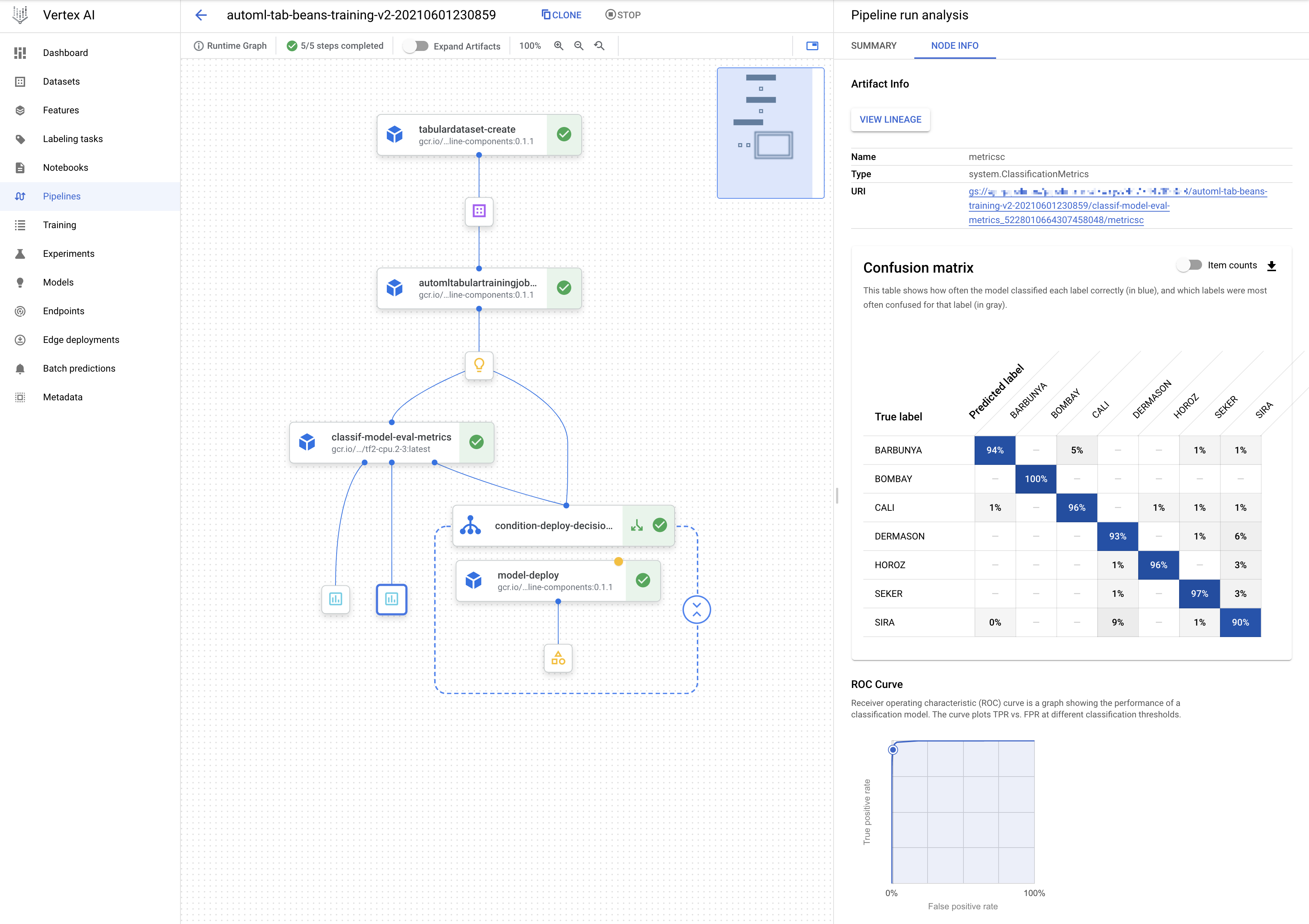
Learn more about Vertex AI Pipelines and AutoML components. Learn more about Classification for tabular data.
In [ ]:
! pip3 install --upgrade --quiet google-cloud-aiplatform \
                                 google-cloud-storage \
                                 kfp \
google-cloud-pipeline-componentsIn [ ]:
import sys

if "google.colab" in sys.modules:

    import IPython

    app = IPython.Application.instance()
app.kernel.do_shutdown(True)In [ ]:
! python3 -c "import kfp; print('KFP SDK version: {}'.format(kfp.__version__))"
! python3 -c "import google_cloud_pipeline_components; print('google_cloud_pipeline_components version: {}'.format(google_cloud_pipeline_components.__version__))"In [ ]:
import sys

if "google.colab" in sys.modules:

    from google.colab import auth

auth.authenticate_user()In [ ]:
PROJECT_ID = "[your-project-id]"  # @param {type:"string"}
LOCATION = "us-central1" # @param {type:"string"}In [ ]:
BUCKET_URI = f"gs://your-bucket-name-{PROJECT_ID}-unique" # @param {type:"string"}In [ ]:
! gcloud storage buckets create --location={LOCATION} --project={PROJECT_ID} {BUCKET_URI}In [ ]:
SERVICE_ACCOUNT = "" # @param {type:"string"}In [ ]:
import sys

IS_COLAB = "google.colab" in sys.modules
if (
    SERVICE_ACCOUNT == ""
    or SERVICE_ACCOUNT is None
    or SERVICE_ACCOUNT == "[your-service-account]"
):
    # Get your service account from gcloud
    if not IS_COLAB:
        shell_output = !gcloud auth list 2>/dev/null
        SERVICE_ACCOUNT = shell_output[2].replace("*", "").strip()

    if IS_COLAB:
        shell_output = ! gcloud projects describe  $PROJECT_ID
        project_number = shell_output[-1].split(":")[1].strip().replace("'", "")
        SERVICE_ACCOUNT = f"{project_number}-compute@developer.gserviceaccount.com"

print("Service Account:", SERVICE_ACCOUNT)In [ ]:
! gcloud storage buckets add-iam-policy-binding $BUCKET_URI --member=serviceAccount:{SERVICE_ACCOUNT} --role=roles/storage.objectCreator

! gcloud storage buckets add-iam-policy-binding $BUCKET_URI --member=serviceAccount:{SERVICE_ACCOUNT} --role=roles/storage.objectViewerIn [ ]:
from typing import NamedTuple

import google.cloud.aiplatform as aiplatform
import kfp
from google.cloud import bigquery
from kfp import compiler, dsl
from kfp.dsl import (Artifact, ClassificationMetrics, Input, Metrics, Output,
component)In [ ]:
# set path for storing the pipeline artifacts
PIPELINE_NAME = "automl-tabular-beans-training"
PIPELINE_ROOT = "{}/pipeline_root/beans".format(BUCKET_URI)In [ ]:
aiplatform.init(project=PROJECT_ID, location=LOCATION, staging_bucket=BUCKET_URI)In [ ]:
@component(
    base_image="gcr.io/deeplearning-platform-release/tf2-cpu.2-6:latest",
    packages_to_install=["google-cloud-aiplatform"],
)
def classification_model_eval_metrics(
    project: str,
    location: str,
    thresholds_dict_str: str,
    model: Input[Artifact],
    metrics: Output[Metrics],
    metricsc: Output[ClassificationMetrics],
) -> NamedTuple("Outputs", [("dep_decision", str)]):  # Return parameter.

    import json
    import logging

    from google.cloud import aiplatform

    aiplatform.init(project=project)

    # Fetch model eval info
    def get_eval_info(model):
        response = model.list_model_evaluations()
        metrics_list = []
        metrics_string_list = []
        for evaluation in response:
            evaluation = evaluation.to_dict()
            print("model_evaluation")
            print(" name:", evaluation["name"])
            print(" metrics_schema_uri:", evaluation["metricsSchemaUri"])
            metrics = evaluation["metrics"]
            for metric in metrics.keys():
                logging.info("metric: %s, value: %s", metric, metrics[metric])
            metrics_str = json.dumps(metrics)
            metrics_list.append(metrics)
            metrics_string_list.append(metrics_str)

        return (
            evaluation["name"],
            metrics_list,
            metrics_string_list,
        )

    # Use the given metrics threshold(s) to determine whether the model is
    # accurate enough to deploy.
    def classification_thresholds_check(metrics_dict, thresholds_dict):
        for k, v in thresholds_dict.items():
            logging.info("k {}, v {}".format(k, v))
            if k in ["auRoc", "auPrc"]:  # higher is better
                if metrics_dict[k] < v:  # if under threshold, don't deploy
                    logging.info("{} < {}; returning False".format(metrics_dict[k], v))
                    return False
        logging.info("threshold checks passed.")
        return True

    def log_metrics(metrics_list, metricsc):
        test_confusion_matrix = metrics_list[0]["confusionMatrix"]
        logging.info("rows: %s", test_confusion_matrix["rows"])

        # log the ROC curve
        fpr = []
        tpr = []
        thresholds = []
        for item in metrics_list[0]["confidenceMetrics"]:
            fpr.append(item.get("falsePositiveRate", 0.0))
            tpr.append(item.get("recall", 0.0))
            thresholds.append(item.get("confidenceThreshold", 0.0))
        print(f"fpr: {fpr}")
        print(f"tpr: {tpr}")
        print(f"thresholds: {thresholds}")
        metricsc.log_roc_curve(fpr, tpr, thresholds)

        # log the confusion matrix
        annotations = []
        for item in test_confusion_matrix["annotationSpecs"]:
            annotations.append(item["displayName"])
        logging.info("confusion matrix annotations: %s", annotations)
        metricsc.log_confusion_matrix(
            annotations,
            test_confusion_matrix["rows"],
        )

        # log textual metrics info as well
        for metric in metrics_list[0].keys():
            if metric != "confidenceMetrics":
                val_string = json.dumps(metrics_list[0][metric])
                metrics.log_metric(metric, val_string)

    logging.getLogger().setLevel(logging.INFO)

    # extract the model resource name from the input Model Artifact
    model_resource_path = model.metadata["resourceName"]
    logging.info("model path: %s", model_resource_path)

    # Get the trained model resource
    model = aiplatform.Model(model_resource_path)

    # Get model evaluation metrics from the the trained model
    eval_name, metrics_list, metrics_str_list = get_eval_info(model)
    logging.info("got evaluation name: %s", eval_name)
    logging.info("got metrics list: %s", metrics_list)
    log_metrics(metrics_list, metricsc)

    thresholds_dict = json.loads(thresholds_dict_str)
    deploy = classification_thresholds_check(metrics_list[0], thresholds_dict)
    if deploy:
        dep_decision = "true"
    else:
        dep_decision = "false"
    logging.info("deployment decision is %s", dep_decision)

    return (dep_decision,)


compiler.Compiler().compile(
    classification_model_eval_metrics, "tabular_eval_component.yaml"
)In [ ]:
@kfp.dsl.pipeline(name=PIPELINE_NAME, pipeline_root=PIPELINE_ROOT)
def pipeline(
    bq_source: str,
    DATASET_DISPLAY_NAME: str,
    TRAINING_DISPLAY_NAME: str,
    MODEL_DISPLAY_NAME: str,
    ENDPOINT_DISPLAY_NAME: str,
    MACHINE_TYPE: str,
    project: str,
    gcp_region: str,
    thresholds_dict_str: str,
):
    from google_cloud_pipeline_components.v1.automl.training_job import \
        AutoMLTabularTrainingJobRunOp
    from google_cloud_pipeline_components.v1.dataset.create_tabular_dataset.component import \
        tabular_dataset_create as TabularDatasetCreateOp
    from google_cloud_pipeline_components.v1.endpoint.create_endpoint.component import \
        endpoint_create as EndpointCreateOp
    from google_cloud_pipeline_components.v1.endpoint.deploy_model.component import \
        model_deploy as ModelDeployOp

    dataset_create_op = TabularDatasetCreateOp(
        project=project,
        location=gcp_region,
        display_name=DATASET_DISPLAY_NAME,
        bq_source=bq_source,
    )

    training_op = AutoMLTabularTrainingJobRunOp(
        project=project,
        location=gcp_region,
        display_name=TRAINING_DISPLAY_NAME,
        optimization_prediction_type="classification",
        optimization_objective="minimize-log-loss",
        budget_milli_node_hours=1000,
        model_display_name=MODEL_DISPLAY_NAME,
        column_specs={
            "Area": "numeric",
            "Perimeter": "numeric",
            "MajorAxisLength": "numeric",
            "MinorAxisLength": "numeric",
            "AspectRation": "numeric",
            "Eccentricity": "numeric",
            "ConvexArea": "numeric",
            "EquivDiameter": "numeric",
            "Extent": "numeric",
            "Solidity": "numeric",
            "roundness": "numeric",
            "Compactness": "numeric",
            "ShapeFactor1": "numeric",
            "ShapeFactor2": "numeric",
            "ShapeFactor3": "numeric",
            "ShapeFactor4": "numeric",
            "Class": "categorical",
        },
        dataset=dataset_create_op.outputs["dataset"],
        target_column="Class",
    )

    model_eval_task = classification_model_eval_metrics(
        project=project,
        location=gcp_region,
        thresholds_dict_str=thresholds_dict_str,
        model=training_op.outputs["model"],
    )

    with dsl.If(
        model_eval_task.outputs["dep_decision"] == "true",
        name="deploy_decision",
    ):

        endpoint_op = EndpointCreateOp(
            project=project,
            location=gcp_region,
            display_name=ENDPOINT_DISPLAY_NAME,
        )

        ModelDeployOp(
            model=training_op.outputs["model"],
            endpoint=endpoint_op.outputs["endpoint"],
            dedicated_resources_min_replica_count=1,
            dedicated_resources_max_replica_count=1,
            dedicated_resources_machine_type=MACHINE_TYPE,
)In [ ]:
compiler.Compiler().compile(
    pipeline_func=pipeline,
    package_path="tabular_classification_pipeline.yaml",
)In [ ]:
# Set the display-names for Vertex AI resources
PIPELINE_DISPLAY_NAME = "[your-pipeline-display-name]"  # @param {type:"string"}
DATASET_DISPLAY_NAME = "[your-dataset-display-name]"  # @param {type:"string"}
MODEL_DISPLAY_NAME = "[your-model-display-name]"  # @param {type:"string"}
TRAINING_DISPLAY_NAME = "[your-training-job-display-name]"  # @param {type:"string"}
ENDPOINT_DISPLAY_NAME = "[your-endpoint-display-name]"  # @param {type:"string"}

# Otherwise, use the default display-names
if PIPELINE_DISPLAY_NAME == "[your-pipeline-display-name]":
    PIPELINE_DISPLAY_NAME = "pipeline_beans-unique"

if DATASET_DISPLAY_NAME == "[your-dataset-display-name]":
    DATASET_DISPLAY_NAME = "dataset_beans-unique"

if MODEL_DISPLAY_NAME == "[your-model-display-name]":
    MODEL_DISPLAY_NAME = "model_beans-unique"

if TRAINING_DISPLAY_NAME == "[your-training-job-display-name]":
    TRAINING_DISPLAY_NAME = "automl_training_beans-unique"

if ENDPOINT_DISPLAY_NAME == "[your-endpoint-display-name]":
    ENDPOINT_DISPLAY_NAME = "endpoint_beans-unique"

# Set machine type
MACHINE_TYPE = "n1-standard-4"
In [ ]:
# Validate region of the given source (BigQuery) against region of the pipeline
bq_source = "aju-dev-demos.beans.beans1"

client = bigquery.Client()
bq_region = client.get_table(bq_source).location.lower()
try:
    assert bq_region in LOCATION
    print(f"Region validated: {LOCATION}")
except AssertionError:
    print(
        "Please make sure the region of BigQuery (source) and that of the pipeline are the same."
    )

# Configure the pipeline
job = aiplatform.PipelineJob(
    display_name=PIPELINE_DISPLAY_NAME,
    template_path="tabular_classification_pipeline.yaml",
    pipeline_root=PIPELINE_ROOT,
    parameter_values={
        "project": PROJECT_ID,
        "gcp_region": LOCATION,
        "bq_source": f"bq://{bq_source}",
        "thresholds_dict_str": '{"auRoc": 0.95}',
        "DATASET_DISPLAY_NAME": DATASET_DISPLAY_NAME,
        "TRAINING_DISPLAY_NAME": TRAINING_DISPLAY_NAME,
        "MODEL_DISPLAY_NAME": MODEL_DISPLAY_NAME,
        "ENDPOINT_DISPLAY_NAME": ENDPOINT_DISPLAY_NAME,
        "MACHINE_TYPE": MACHINE_TYPE,
    },
    enable_caching=True,
)In [ ]:
# Run the job
job.run()In [ ]:
pipeline_df = aiplatform.get_pipeline_df(pipeline=PIPELINE_NAME)
print(pipeline_df.head(2))In [ ]:
# Delete the Vertex AI Pipeline Job
job.delete()

# List and filter the Vertex AI Endpoint
endpoints = aiplatform.Endpoint.list(
    filter=f"display_name={ENDPOINT_DISPLAY_NAME}", order_by="create_time"
)
# Delete the Vertex AI Endpoint
if len(endpoints) > 0:
    endpoint = endpoints[0]
    endpoint.delete(force=True)

# List and filter the Vertex AI model
models = aiplatform.Model.list(
    filter=f"display_name={MODEL_DISPLAY_NAME}", order_by="create_time"
)
# Delete the Vertex AI model
if len(models) > 0:
    model = models[0]
    model.delete()

# List and filter the Vertex AI Dataset
datasets = aiplatform.TabularDataset.list(
    filter=f"display_name={DATASET_DISPLAY_NAME}", order_by="create_time"
)
# Delete the Vertex AI Dataset
if len(datasets) > 0:
    dataset = datasets[0]
    dataset.delete()

# Delete the Cloud Storage bucket
delete_bucket = False  # Set True for deletion
if delete_bucket:
    ! gcloud storage rm --recursive $BUCKET_URI